The story
SituationYour accountant is reviewing the company's e-Invoicing readiness and asks: "Who submits the e-Invoices for our online orders, and what happens when a customer wants one?"
ChallengeOnline orders come in at all hours across several outlets, your team cannot raise an e-Invoice by hand for each one, and you need to know what stays your responsibility.
MissionUnderstand how Shoppertise submits e-Invoices for you, what you need to set up once, and where your legal responsibility sits.
This guide explains the whole model on one page, with links to the detailed answers.
Quick answer
Shoppertise Eats Venture acts as your authorised intermediary in the IRBM (LHDN) MyInvois system.
Once you add Shoppertise as your Intermediary and send your entity details, Shoppertise submits an e-Invoice for you whenever a customer requests one, and a consolidated e-Invoice each month for everyone else. The legal responsibility for the sale stays with your company.
What the diagram shows
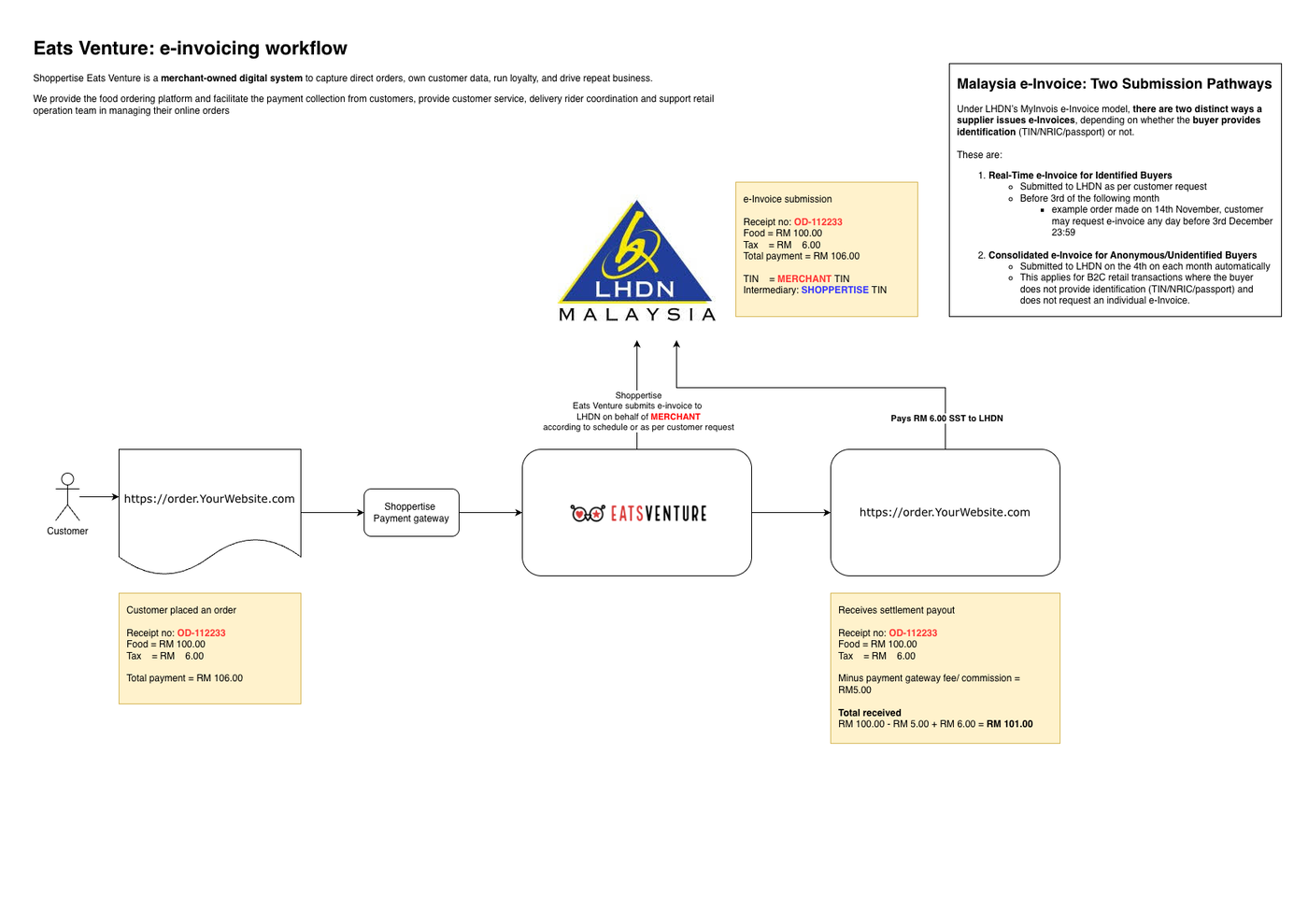
The diagram, titled Eats Venture: e-invoicing workflow, follows one example order, receipt no. OD-112233, with food of RM 100.00 and tax of RM 6.00, a total payment of RM 106.00.
Customer placed an order on the merchant's own ordering website and paid RM 106.00.
The payment goes through the Shoppertise payment gateway to Eats Venture.
e-Invoice submission: Shoppertise Eats Venture submits the e-invoice to LHDN on behalf of the merchant, according to schedule or as per customer request. The e-Invoice carries the merchant's TIN as the supplier, with Shoppertise's TIN as the intermediary.
The merchant receives the settlement payout for the order, after the fees set out in its agreement with Shoppertise, and pays the RM 6.00 SST to LHDN.
The diagram also states that Shoppertise Eats Venture is a merchant-owned digital system to capture direct orders, own customer data, run loyalty and drive repeat business.
It also states that Shoppertise provides the food ordering platform, facilitates payment collection from customers, provides customer service and delivery rider coordination, and supports the retail operation team in managing online orders.
The box Malaysia e-Invoice: Two Submission Pathways explains that under LHDN's MyInvois e-Invoice model there are two distinct ways a supplier issues e-Invoices, depending on whether the buyer provides identification (TIN, NRIC or passport):
Real-Time e-Invoice for Identified Buyers: submitted to LHDN as per the customer's request, which they can make from the order's pickup or delivery date until the 3rd of the following month. For example, for an order picked up or delivered on 14 November, the customer may request an e-Invoice any day before 3 December, 23:59.
Consolidated e-Invoice for Anonymous/Unidentified Buyers: submitted to LHDN automatically on the 4th of each month. This applies to B2C retail transactions where the buyer does not provide identification (TIN, NRIC or passport) and does not request an individual e-Invoice.
See Is there a timeline for Buyers to request? and Does Shoppertise issue consolidated e-Invoices? for each pathway.
Overview
Shoppertise Eats Venture acts as an authorized intermediary to facilitate the submission of e-Invoices to the Inland Revenue Board of Malaysia (IRBM/LHDN) on your behalf.
This framework defines the step-by-step journey for your Buyers while ensuring all transactions follow regulated validation workflows and strict submission timelines. By authorizing us to manage these submissions through the official MyInvois system, you can reduce operational complexity while maintaining full tax compliance.
Who Is This For
This applies to you if your business is legally required to issue e-Invoices under the IRBM’s mandatory implementation phases.
Your Action Required: If you fall under the current mandatory phase, you must complete the authorization steps in the MyInvois portal and provide Shoppertise with your specific entity details.
The steps are in How do I integrate my business with the MyInvois (IRBM) portal?: register your MyInvois account if you do not have one, add Shoppertise as your Intermediary, and fill in the E-Invoicing Activation Form with your entity details and go-live date.
Caution
Whether and from when your business must issue e-Invoices depends on IRBM's implementation phases, not on Eats Venture. If you are unsure which phase applies to you, check with your accountant or tax adviser before your go-live date.
How the Intermediary Model Works
1. Grant Authorization: You grant Shoppertise Eats Venture "Intermediary" status within your IRBM MyInvois portal.
2. Submission: When a Buyer requests an e-Invoice, Shoppertise automatically generates and submits the data to IRBM on your behalf.
3. Compliance: While Shoppertise facilitates the technical submission, the legal responsibility for the accuracy of the sale remains tied to your legal entity.
What it looks like day to day
Customers request it themselves. Once an order is completed, the customer can click Request e-Invoice in their receipt email or under My Orders, fill in their tax details and submit. See Where can the Buyer request the e-Invoice? and What information must a Buyer provide to receive an e-Invoice?
The customer receives it by email. After IRBM validates it, the e-Invoice is emailed to the customer as a PDF. You can check its status, resend it and download it from Orders > Past Orders in Web Admin. See Will Shoppertise share the e-Invoice with Merchants?
Everyone else is covered monthly. Orders nobody requested are submitted as a consolidated e-Invoice on the 4th of the following month.
Your menu codes matter. Each menu item carries an LHDN e-Invoice classification code, which defaults to 022 - Others. See Setting Up Menu Item Tax Codes for e-Invoicing.
Your settlement does not change. See Will there be any changes to my Sales Settlement?
Note
The commercial contract remains between you and the Buyer; Shoppertise acts as a facilitator and is not a party to the sale. See Who issues the e-Invoice to Buyers?
Your team keeps serving; the e-Invoices are submitted in the background.
Managing Multiple Legal Entities
If you operate through multiple Sdn Bhd companies (e.g., different branches under different corporate registrations):
Individual Authorization: You must complete the authorization process individually for each Sdn Bhd.
No Shared Access: Authorization cannot be consolidated; the setup must be repeated for every company and its respective outlets to ensure invoices are mapped to the correct tax registration.
On Eats Venture, each outlet is linked to the details of the company that owns it, so every e-Invoice from that outlet is submitted under that company's TIN. See Can my customers request e-Invoices for all my store locations?
CEO tip
If some outlets invoice through their own POS instead, they can stay on that system: their customers are directed to your Finance team. See How are requests handled if my business uses a third-party POS for e-Invoicing?
Mission accomplished: what you have achieved
- A clear model. You know Shoppertise submits e-Invoices as your intermediary, on request and monthly.
- A short setup list. Authorise Shoppertise in MyInvois and send your entity details, once per Sdn Bhd.
- Responsibility understood. The sale and its accuracy stay with your company; the submission is handled for you.
When your accountant asks again, you can answer in one sentence and send them this page.
Related
Last updated: 27 October 2026