Quick answer
From the Request e-Invoice button in the receipt email, or from Accounts > My Orders on your ordering site after logging in. The option appears once the order is completed. Brands that handle e-Invoicing through their own POS show Finance team contact details instead.
Where Buyers can request
Buyers can make a request at multiple points:
The Receipt Email (via a dedicated link). (a)
The Accounts > My Orders section (available after logging into their account). (b)
(a) The receipt email
(a)
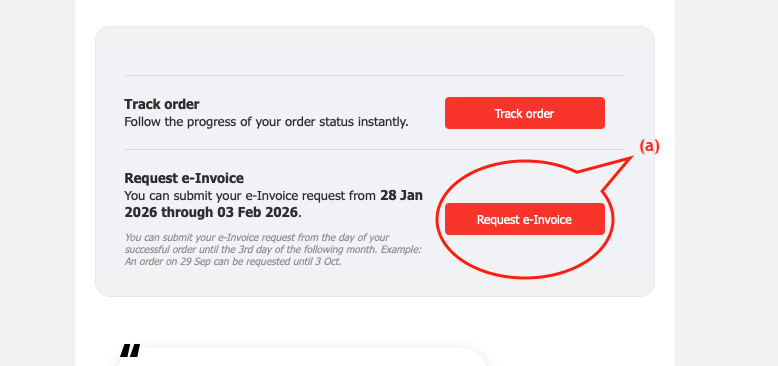
The receipt email has a Request e-Invoice section below Track order. It shows the request dates for that order, for example "You can submit your e-Invoice request from 28 Jan 2026 through 03 Feb 2026.", and the reminder: "You can submit your e-Invoice request from the day of your successful order until the 3rd day of the following month.
Example: An order on 29 Sep can be requested until 3 Oct." The Request e-Invoice button opens the request form for that order directly, so the Buyer does not need to log in. The window is counted from the order's pickup or delivery date, not the day the order was placed or paid, and closes at the end of the 3rd day of the following month.
(b) My Orders
(b)

On My Orders, each eligible order has a Request e-Invoice button next to Track order, Resend receipt and Reorder. The order card also has an e-Invoice column that shows the request status once the Buyer has submitted. The button is hidden once a request has been submitted, or after the request window has closed.
E-invoice will be available after the order is completed. Buyers can check back once the order has been fulfilled.
If the Buyer opens the request before the order is completed, they see e-Invoice Not Available Yet. See When can Buyers request an e-Invoice? and Is there a timeline for Buyers to request?
Requesting for Specific Brands (Manual Process)
Requesting for Specific Brands (Manual Process)
If you are not using Shoppertise’s integrated e-Invoicing (e.g., POS providers), the standard "Request" button will be replaced with instructions to email your Finance team directly.
The Buyer sees "For e-Invoicing, please contact" followed by your brand name and "Finance Department directly at" your finance email address, and a Contact Finance button that opens an email pre-filled with the order number. See How are requests handled if my business uses a third-party POS for e-Invoicing?
What the Buyer provides
To comply with IRBM requirements, Buyers will be prompted to provide mandatory details, including their full name, IC/ID number, address, contact number, and SST number (if applicable).
Once validated by IRBM, the visual presentation of the e-Invoice will be sent to the email address provided by the Buyer during the request process.
The full list of fields, and the formats the form accepts, is in What information must a Buyer provide to receive an e-Invoice?
Customer service tip
Logged-in customers can tick Use these details for future e-Invoice submissions on the form. Their details are then filled in for them next time, which suits regular corporate customers.
Related
Last updated: 27 October 2026